A practical guide for “group photo poses for 8 people”
For a real photograph of all eight, arrange the group in person and use a camera or photographer. Keep faces visible and choose positions everyone finds comfortable. The diagrams below are planning maps, not photographs or app results.
Three arrangements for all eight people
These maps show positions for a real photograph of all eight people. They are not AI results. Nothing is uploaded or generated here.
Open the one-page printable field sheet (PDF) ↗Take all three maps and a camera checklist to your photo session. Free to save or print. No app, account or photo upload needed.
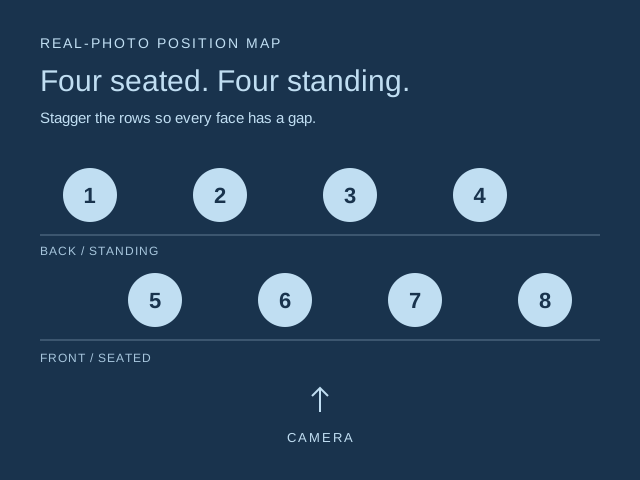
Four seated, four standing
Seat four people on stable chairs, with four standing behind. Stagger the back row into the gaps instead of hiding one face behind another. Keep the rows close enough to share the light, then check all eight faces through the camera.
A shallow arc of eight
Stand in a gentle curve, all facing the camera. Keep the curve shallow so the outer people are not far in front of the centre. Leave space at both edges and take a test photo before choosing the final crop.
Four relaxed pairs
Arrange four pairs across the frame, with a little space between pairs. Ask everyone to turn slightly inward and keep faces visible. Use comfortable gestures that each person agrees to; a pair can be friends, relatives or teammates.
Before you take the photo
- Choose a level, accessible spot and a position everyone finds comfortable. No climbing or balancing on furniture.
- Keep the camera centred and step back if someone is squeezed into the edge. Check the test photo for hidden faces, closed eyes and feet cut off.
- Ask before photographing or sharing anyone. A real group photograph records the people who were actually there; do not substitute an AI image as event evidence.
For an optional AI keepsake
The arrangements above are for your real eight-person photograph. For a separate AI composition, check photo limits in your current app version and inspect every face in the result. This guide does not demonstrate an eight-person AI result.
TogetherLens creates a new composition from the people you provide. It does not need matching backgrounds, but it does need clear facial information. Start with the original file when possible rather than a screenshot downloaded from a social network or messaging app.
- Check the photo-selection limit in your current app version
- Use one clear, permissioned portrait per selected person
- Keep the original eight-person photograph unchanged
- Keep each face fully visible and ask every living person for permission.
Create a separate AI scene (optional)
- Add the selected portraits.Check the group limit in your current app version. Use one clear, permissioned portrait per person and review every crop.
- Choose one or two vibes.Pick a scene that supports the story instead of competing with the faces.
- Inspect the result.Check eyes, teeth, hands, clothing, jewelry, and meaningful background details before sharing or printing.
For optional AI generation, check photo limits in your current app version. Photo generation uses paid tokens; Premium is optional. Check current prices and terms before buying.
What to avoid
- Hiding a face directly behind another person
- Climbing or balancing on furniture for a pose
- Photographing or sharing someone without permission
- Presenting an AI keepsake as a photograph of a real gathering
Generated photos are creative images, not documentary evidence. Disclose that the result is AI-generated when context matters, and never use someone’s face to impersonate, embarrass, or mislead.
Questions about this portrait
What is an easy group photo pose for eight people?
Start with four seated people and four standing behind them. Stagger the back row into the gaps, keep the camera centred and check a test photo for all eight faces. Use stable seating and comfortable, accessible positions.
Can all eight people stand in one row?
Yes. Use a shallow arc, face the camera and leave room at both edges. Keep the curve shallow so the outer people are not far in front of the centre, then inspect a test photo before choosing the crop.
Can TogetherLens generate eight people in one image?
Check the photo-selection limit in your current app version. This guide does not verify an eight-person AI result or guarantee that every face will be preserved. TogetherLens creates a new AI composition from separate portraits, not a record of a real gathering. Use the maps above for a real photograph of all eight.
Are these maps free, and do they upload my photos?
The position maps and camera checklist are free to read. This page does not collect photos, upload files or generate images. Arrange the people yourself for a real photo.
Is the optional app generation free?
TogetherLens is free to install. Photo generation uses paid tokens; Premium is optional and auto-renewing. Check current purchase options, prices and renewal or cancellation terms in the app before buying. The free position maps do not generate images or change the app's purchase options.